1.5. Practice Exercises
Exercise 1: Person Class
Person Class
Consider the code for a Person class below, which is used
throughout this activity.
 1public class Person {
 2
 3   private String name;
 4   private int age;
 5
 6   public Person(String name, int age) {
 7      this.name = name;
 8      this.age = age;
 9   } // Person
10
11   public String getName() {
12       return this.name;
13   } // getName
14
15   public void setName(String name) {
16       this.name = name;
17   } // setName
18
19   public int getAge() {
20       return this.age;
21   } // getAge
22
23   public void setAge(int age) {
24       this.age = age;
25   } // setAge
26
27} // Person
Question 1
Answer the following questions about the Person class:
Identify the class’s instance variables. How many instance variables are there?
Identify the class’s constructors. How many constructors are there?
Identify the class’s methods. How many methods are there?
Which methods declare local variables? Which do not?
Note
Method parameters are considered local variables.
Solution
nameandage– (2)public Person(String name, int age)– (1)getName(),setName(String name),getAge(), andsetAge(int age)– (4)The
setName(String name)andsetAge(int age)methods declare 1 local variable each, and the other methods do not declare any local variables. The constructor, which can be considered a special method, declares 2 local variables.
Question 2
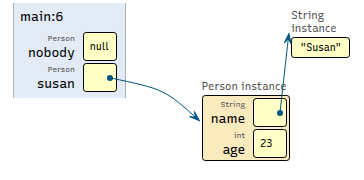
Draw a diagram that depicts what the program’s memory looks like after executing the code below.
Person nobody = null;
Person susan = new Person("Susan", 23);
Solution
Question 3
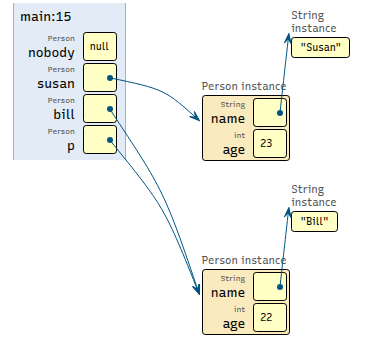
Draw a memory map diagram depicting the state of the variables after the first half of the code below executes. Once your memory map is complete, write down what the output of the second half should be.
// first half
Person nobody = null;
Person susan = new Person("Susan", 23);
Person bill = new Person("Bill", 22);
Person p = bill;

// second half
System.out.println(nobody);
System.out.println(susan.getName());
System.out.println(bill.getAge());
System.out.println(p.getAge());
Solution
Question 4
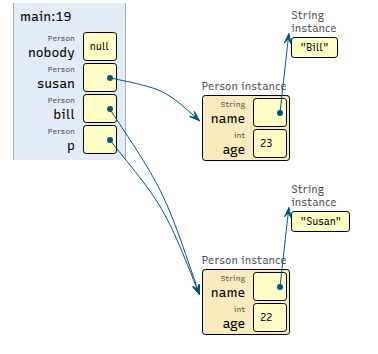
Draw a new memory diagram that takes into consideration the new code in the middle. After that, write down the output of the print statements near the bottom.
// these four lines have not changed
Person nobody = null;
Person susan = new Person("Susan", 23);
Person bill = new Person("Bill", 22);
Person p = bill;

// new code
susan.setName("Bill");
bill.setName("Susan");

// print statements
System.out.println(susan.getName());
System.out.println(bill.getName());
System.out.println(p.getName());
System.out.println(nobody);
Solution
Note
You may be surprised by the fact that this compiles, runs
without crashing, and produces output, given that
nobody is used in the last print statement and the
value of nobody is null.
It’s okay to print null. This value is only a
problem when you try to use it as a calling object.
Question 5
Using the updated memory map you drew for the last question, write down the output of the code below.
// these four lines have not changed
Person nobody = null;
Person susan = new Person("Susan", 23);
Person bill = new Person("Bill", 22);
Person p = bill;

// these four lines have not changed
susan.setName("Bill");
bill.setName("Susan");

// ignore the other print statements from earlier
// ...
System.out.println(nobody.getName());
Solution
This crashes when run due to a NullPointerException that
is encountered when nobody.getName() is executed.
Exercise 2: SalaryAccount Class
SalaryAccount Class
You should assume the class below exists and is in scope for the questions in this subsection:
 1public class SalaryAccount {
 2
 3   private int hours;
 4   private double rate;
 5
 6   public SalaryAccount(int hours, double rate) {
 7      // assume appropriate error handling...
 8      this.hours = hours;
 9      this.rate = rate;
10   } // SalaryAccount
11
12} // SalaryAccount
Question 1
Draw the memory map that represents the state of the variables after the following code executes:
SalaryAccount acct = new SalaryAccount(8, 20.0);
Solution
Your memory map should look similar to the following:

Question 2
Draw the memory map that represents the state of the variables after the following code executes:
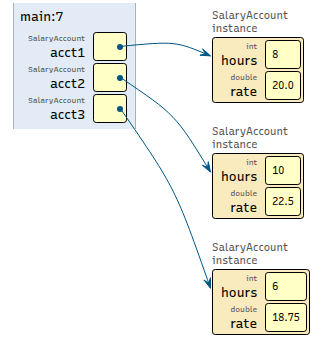
3SalaryAccount acct1 = new SalaryAccount(8, 20.0);
4SalaryAccount acct2 = new SalaryAccount(10, 22.5);
5SalaryAccount acct3 = new SalaryAccount(6, 18.75);
Solution
Your memory map should look similar to the following: